You type it dozens of times a day. It sits in every web address, every email, every link you’ve ever clicked. And if you’re like most people — including plenty of folks who work in tech — you’ve never once thought about what it actually does.
We’re talking about the period. The humble dot in .com.
Here’s the thing: that dot isn’t decoration, and it isn’t punctuation. It’s structure — and once you see what it’s doing, you’ll never look at a web address the same way again.
There’s a hidden dot at the end of every web address
Let’s start with the fact that breaks most people’s brains: every domain name you’ve ever used secretly ends with a dot. The complete, technically correct form of our website isn’t gillytech.com — it’s gillytech.com. — with a trailing period.
Don’t take our word for it. Type gillytech.com. into your browser’s address bar — dot at the end and all — and hit enter. It loads. That’s not a bug or your browser being forgiving. That trailing dot is part of the real address; browsers just hide it from you the way they hide a lot of the internet’s plumbing.
That final, invisible dot represents the root zone — the very top of the internet’s naming system. Every single domain lookup on earth technically starts there, at the dot.
Web addresses are read backwards
Those dots are dividers in a hierarchy — and the hierarchy runs right to left, the opposite of how you read it. Take www.gillytech.com. and walk it backwards:
- The trailing dot — the root of the entire internet naming system.
com— a top-level domain that lives inside the root.gillytech— our domain, registered insidecom.www— a subdomain we control, insidegillytech.
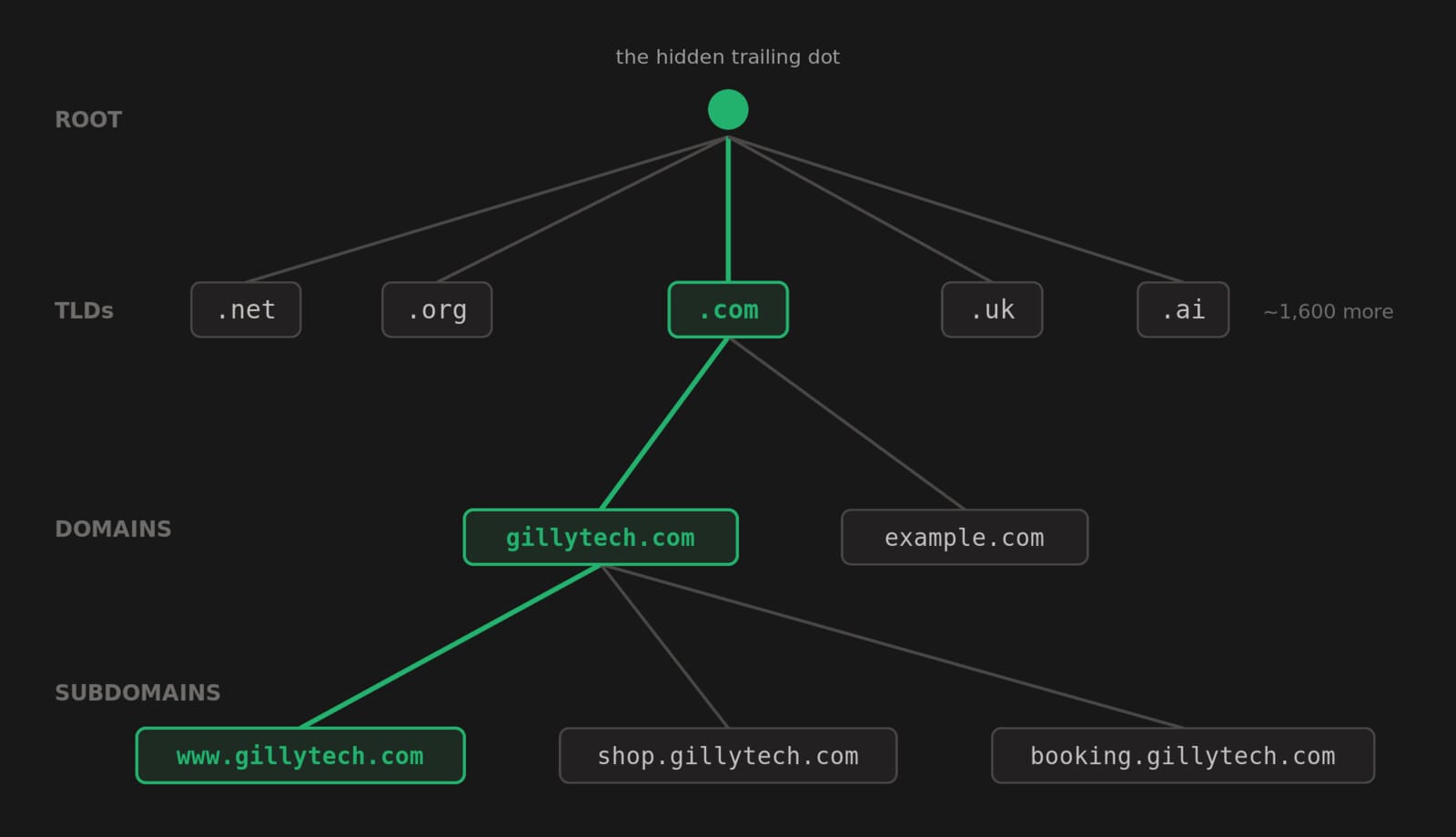
Each dot marks a handoff to a different level of a giant, distributed tree. When your computer looks up an address, it asks the root (“who handles com?”), then the com registry (“who handles gillytech?”), then our name servers (“where’s www?”). Three questions, answered in milliseconds, every time you visit a website. We covered how that lookup works in detail in our guide to DNS zone files.
This also means www was never magic. It’s just a subdomain — a naming convention from the early web. You can create shop.yourcompany.com or booking.yourcompany.com any time you like, for free, because everything to the left of your domain belongs to you.
So what is .com, really?
.com is a top-level domain (TLD) — one of the branches growing directly off that root dot. It started in 1985 as shorthand for “commercial,” and it’s still the default the world trusts. But it has company: the IANA root database now lists nearly 1,600 TLDs, with around 1,400+ actively in use — from country codes like .uk and .ca to newer options like .shop, .agency and .dev.
Some fun consequences of the country-code system: the tiny Pacific nation of Tuvalu earns real national revenue licensing .tv to streaming companies, and Anguilla’s .ai became a windfall when the AI boom hit. The dot giveth.
Each TLD is run by a registry that maintains the master list of every name inside it. When you “buy a domain,” what you’re really buying is an entry in that registry — a line in the internet’s address book that says this name, inside this TLD, belongs to you and points at your name servers.
Why should a business owner care?
Beyond winning bar bets with the trailing-dot trick, this stuff has real consequences:
- Your TLD is a trust signal.
.comstill carries the most credibility with customers. Exotic TLDs can work — but cheap ones (.xyz,.top) are so popular with spammers that some email filters treat them with suspicion. - Watch the dots in links you click. Scammers exploit the hierarchy:
yourbank.secure-login.comis NOT your bank — read right to left, it’s the domainsecure-login.comwearing your bank’s name as a subdomain costume. The dots tell you who really owns an address. - Subdomains are free real estate. A booking portal, a client area, a landing page for a campaign — all can live on subdomains you already own, no new registration required.
- Whoever controls your DNS controls your business. Your domain is the one asset that connects your website, your email and your reputation. Losing access to it — or leaving it in an ex-developer’s personal account — is an existential risk we’ve seen play out more than once.
The dot holds it all together
One character. It marks the root of the internet, separates the levels of a naming tree that spans the planet, funds small island nations, and quietly ends every address you’ve ever typed. Not bad for a period.
If reading this made you realize you’re not actually sure who controls your domain, your DNS or your hosting — that’s worth fixing before it becomes a problem. Book a free 15-minute call and we’ll help you take stock. We manage domains, DNS and high-performance hosting for businesses that would rather never think about the plumbing again.


Company News
Every Layer Under a Website Got More Expensive This Year. Our Hosting Prices Did Not.
Oct 12, 2026